Shineyrock
blog
-
dislike -15
Don’t Forget to Cover Your Client Side!
By making sure that your application is tested, you are able to reduce the amount of bugs you find in your code, increase the maintainability of your application, and design well structured code.
Client side unit testing presents different challenges than server side testing. When dealing with client side code, you will find yourself struggling to separate application logic from DOM logic, as well as just structuring JavaScript code in general. Fortunately there are a lot of great client side testing libraries out there to help test your code, create metrics about the test coverage, as well as analyze the complexity of it.
Why Test at All?
First of all, unit testing in general is a way to reduce bugs by ensuring that your application functions as it's supposed to. Beyond that though, are the notions of Test Driven Development (TDD) and Behavior Driven Development (BDD).
These two unit testing strategies will help you design your application by writing tests before you write your application logic. By writing the tests before you write the code, you're giving yourself the opportunity to think through the design of your application.
This happens because when you're writing tests, you're basically trying to design the API for how you interact with your code, so you therefore get better insight into its design. Testing first will quickly show you any flaws you have in your design because you're writing test code that essentially uses the code you're writing!
TDD is a code discovery process
You'll learn that TDD helps you discover your code as you're writing it. TDD is summed up very quickly as "Red, Green, Refactor". What this means is, you write a test, write enough code to make the test fail first. Then, you write the code that makes your test pass. After that, you think through what you just wrote and refactor it. Nice and easy.
BDD is a slightly different take on TDD and is based more on business requirements and specifications.
Client Side Testing
There are many reasons that you should be testing your client side code. As mentioned before, it will help reduce bugs, and help you design your application. Client side testing is also important because it gives you a chance to test your front end code, in isolation, away from your presentation. In other words, one of its advantages is you get to test your JavaScript code without actually spinning up an application server. You simply run the tests and make sure things function without clicking around and testing things. In many cases, you don't even have to have internet access, as long as your tests are set up correctly.
With JavaScript taking such an important role in modern web development, it's important to learn how to test code and reduce the chances of bugs making their way into production code. Your boss doesn't like it when that happens and neither should you! In fact, a good place to get started working with client side testing is to write tests around a bug report. This will allow you to get practice writing tests when you don't have a place to start from scratch.
Another reason to test your client side code is that once a suite of tests exists and has decent coverage over your code, when you get ready to go and add new features to your code, you'll be able to add the new feature, re-run your tests, and make sure you didn't regress and break any existing features.
Getting Started
Getting started with client side testing can be daunting if you've never done it before. One of the hardest parts about client side testing is figuring out the best way to isolate the DOM from your application's logic. That often means you'll need some sort of abstraction over the DOM. The easiest way to achieve this is through a client side framework such as Knockout.js, Backbone.js, or Angular.js, to name just a few.
When using a library such as these, you get to think less about how your page renders in the browser and more about the features of your application. It's not like it's impossible to unit test with just plain JavaScript though. In that case, your life will be much easier if you design the code in such a way that the DOM can easily be abstracted.
Choose a Testing Library
There are a lot of different testing libraries to choose from, although the three front runners tend to be QUnit, Mocha, and Jasmine.
Jasmine and Mocha are both from the BDD school of unit testing, whereas QUnit is just a unit testing framework of its own.
For the rest of this post, we'll explore using QUnit as its barrier to entry in client side testing is very low. Check out this detailed intro to QUnit for more information.
TDD Your Code With QUnit
Getting started with QUnit is extremely simple. The following HTML is all you need:
<!DOCTYPE html>
<html>
<head>
    <meta charset="utf-8">
    <title>QUnit Example</title>
    <link rel="stylesheet" href="qunit.css">
</head>
<body>
    <div id="qunit"></div>
    <div id="qunit-fixture"></div>
    <script src="qunit.js"></script>
    <script src="../app/yourSourceCode.js"></script>
    <script src="tests.js"></script>
</body>
</html>
For the next few examples, let's assume that we're building a small widget that you input a zip code into a text box and it returns the corresponding city, state, and county values using Geonames. It'll show only a zip code at first, but as soon as the zip code has five characters it'll retrieve the data from Geonames. If it is able to find data, it will show a few more fields containing the resulting city, state, and county information. We'll also be using Knockout.js. The first step is to write a failing test.
Thinking through the design slightly before the first test is written, there probably needs to be at least two viewModels, so that will be a good starting point. To start off, we'll define a QUnit Module and our first test:
module("zip code retriever");
test("view models should exist", function() {
    ok(FormViewModel, "A viewModel for our form should exist");
    ok(AddressViewModel, "A viewModel for our address should exist");
});
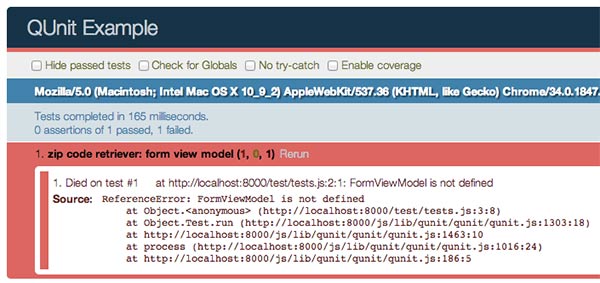
If you run this test, it will fail, now you can go write the code to make it pass:
var AddressViewModel = function(options) {

};

var FormViewModel = function() {
    this.address = new AddressViewModel();
};
You'll see green rather than red this time. Tests like this seem a bit silly at first, but they are useful in that they force you to at least think through some of the early stages of your design.

The next test we will write will work on the
AddressViewModel's functionality. We know from the specification of this widget that the other fields should be hidden at first, until the data is found for the zip code.module("address view model"); test("should show city state data if a zip code is found", function() { var address = new AddressViewModel(); ok(!address.isLocated()); address.zip(12345); address.city("foo"); address.state("bar"); address.county("bam"); ok(address.isLocated()); });None of the code for this has been written yet, but the idea here is that the
isLocatedwill be a computed observable, that returnstrueonly when the zip, city, state, and county are all truthy. So, this test will of course fail at first, now let's write the code to make it pass.var AddressViewModel = function(options) { options = options || {}; this.zip = ko.observable(options.zip); this.city = ko.observable(options.city); this.state = ko.observable(options.state); this.county = ko.observable(options.county); this.isLocated = ko.computed(function() { return this.city() && this.state() && this.county() && this.zip(); }, this); this.initialize(); };Now if you run the tests again, you'll see green!
This is, at its most basic, how you can use TDD to write front end tests. Ideally, after each failing test, you'd write the simplest code that will make the test pass and then go back and refactor the code. You can learn a lot more about TDD practices though, so I suggest reading up and studying it further, but the previous examples are enough to get your mind thinking about writing tests first.
Mocking Dependencies With Sinon.js
Sinon.js is a JavaScript library that provides the ability to spy, stub, and mock JavaScript objects. When writing unit tests you want to make sure that you are able to test only a given "unit" of code. This oftentimes means you'll have to do some sort of mocking or stubbing of dependencies to isolate the code being tested.
Sinon has an extremely simple API for doing this. The Geonames API supports retrieving data via a JSONP endpoint, which means we'll be able to easily use
$.ajax.Ideally though, you won't have to depend on the Geonames API in your tests. They could be down temporarily, your internet may die, and it also is just slower to actually make the ajax call. Sinon to the rescue.
test("should only try to get data if there's 5 chars", function() {
    var address = new AddressViewModel();

    sinon.stub(jQuery, "ajax").returns({
        done: $.noop
    });

    address.zip(1234);

    ok(!jQuery.ajax.calledOnce);

    address.zip(12345);

    ok(jQuery.ajax.calledOnce);

    jQuery.ajax.restore();
});
Here in this test, we're doing a few things. First of all, the
sinon.stubfunction is actually going to proxy overjQuery.ajaxand add the ability to see how many times it has been called, and many other assertions. As the test reads, "should only try to get data if there's 5 chars", we are going to assume that when the address is set to just "1234", that no ajax call has been made yet, then set it to "12345", and by that point an ajax call should be made.We then need to restore
jQuery.ajaxto its original state, because we are good citizens of unit testing and want to keep our tests atomic. Keeping your tests atomic is important to ensure that one test does not depend on another test, and there's no shared state between tests. They can then be ran in any order as well.Now that the test is written, we can run it, watch it fail, and then write the code that performs the ajax request to Geonames.
AddressViewModel.prototype.initialize = function() {
    this.zip.subscribe(this.zipChanged, this);
};

AddressViewModel.prototype.zipChanged = function(value) {
    if (value.toString().length === 5) {
        this.fetch(value);
    }
};

AddressViewModel.prototype.fetch = function(zip) {
    var baseUrl = "http://www.geonames.org/postalCodeLookupJSON"

    $.ajax({
        url: baseUrl,
        data: {
            "postalcode": zip,
            "country": "us"
        },
        type: "GET",
        dataType: "JSONP"
    }).done(this.fetched.bind(this));
};
Here we are subscribing to changes of the zip code. Whenever it changes, the
zipChangedmethod will be called. ThezipChangedmethod will check to see if the length of the value of the zip is5. When it reaches5, thefetchmethod will be called. Here is where the Sinon stub comes in to play. At this point,$.ajaxis actually a Sinon stub. SocalledOncewill then betruein the test.The final test we'll write is for when the data comes back from the Geonames service:
test("should set city info based off search result", function() {
    var address = new AddressViewModel();

    address.fetched({
        postalcodes: [{
            adminCode1: "foo",
            adminName2: "bar",
            placeName: "bam"
        }]
    });

    equal(address.city(), "bam");
    equal(address.state(), "foo");
    equal(address.county(), "bar");
});
This test will test how the data from the server gets set onto the
AddressViewmodel. Run it, see some red. Now make it green:AddressViewModel.prototype.fetched = function(data) { var cityInfo; if (data.postalcodes && data.postalcodes.length === 1) { cityInfo = data.postalcodes[0]; this.city(cityInfo.placeName); this.state(cityInfo.adminCode1); this.county(cityInfo.adminName2); } };The fetched method just makes sure there is an array of
postalcodesin the data from the server, and then sets the corresponding properties on theviewModel.See how easy this is now? Once you get the flow of doing this down, you'll find yourself hardly ever wanting to not TDD again. You end up with nice small functions that are testable. You force yourself into thinking about how your code interacts with its dependencies. And now you have a suite of tests to run when some other new requirement is added to the code. Even if you miss something and there is a bug in the code, you are now able to simply add a new test to the suite, to prove that you've fixed the bug! It actually ends up being kind of addicting.
Test Coverage
Test coverage provides an easy way to evaluate how much of your code has been tested by a unit test. It's often hard and not worth it to reach 100% coverage, but do what you can to get it as high as possible.
One of the newer and easier coverage libraries is called Blanket.js. Using it with QUnit is dead simple. Simply grab the code right off of their homepage or install it with Bower. Then add blanket as a library in the bottom of your
qunit.htmlfile, and then adddata-coverto all of the files you want coverage tests on.<script src="../app/yourSourceCode.js" data-cover></script> <script src="../js/lib/qunit/qunit/qunit.js"></script> <script src="../js/lib/blanket/dist/qunit/blanket.js"></script> <script src="tests.js"></script> </body>Done. Super easy, and now you'll get an option in your QUnit runner for showing coverage:

In this example, you can see that the test coverage isn't quite 100%, but in this case since there's not much code, it'll be easy to bump it up. You can actually drill down and see the exact functions that haven't been covered yet:

Here in this case, the
FormViewModelwas never instantiated in the tests and therefor is missing test coverage. You can then simply add a new test that creates an instance of theFormViewModel, and perhaps write an assertion that checks that theaddressproperty is present and is aninstanceOftheAddressViewModel.You'll then get the pleasure of seeing 100% test coverage.

Complexity Tests
As your applications get larger and larger, it's nice to be able to run some static analysis on your JavaScript code. A great tool for running analysis on JavaScript is called Plato.
You can run
platoby installing it vianpmwith:npm install -g plato
Then you can run
platoon a directory of JavaScript code:plato -r -d js/app reports
This will run Plato on all of the JavaScript located at "
js/app" and output the results intoreports. Plato runs all kind of metrics on your code, including average lines of code, a computed maintainability score, JSHint, difficult, estimated errors, and more.
There is not a whole lot to see in that previous image, simply because for the code we've been working on, there's only one file, but when you get into working with a large application that has a lot of files and lines of code, you'll find the information it gives you extremely useful.
It even keeps track of all of the times you've run it, so you can see how your statistics change over time.
Conclusion
While testing the client side seems like a difficult proposition, there are so many great tools to use these days to make it super easy. This article barely scratches the surface of all of the things out there nowadays to make client side testing easy. It can be a tedious task, but you'll find that in the end, the benefits of having a test suite and testable code far outweighs it. Hopefully with the steps outlined here, you'll be able to begin testing client side code quickly.

martijn broeders
founder/ strategic creative at shineyrock web design & consultancy
e-mail: .(JavaScript must be enabled to view this email address)
phone: 434 210 0245
By - category
By - date
-
December, 2023
-
The Best Small Business Web Designs by DesignRush
/ 2
2 -
October, 2022
-
Create Modern Vue Apps Using Create-Vue and Vite
/ 9 -
September, 2022
-
Pros and Cons of Using WordPress
/ -1
-1 -
How to Fix the “There Has Been a Critical Error in Your Website” Error in WordPress
/ 2 -
How To Fix The “There Has Been A Critical Error in Your Website” Error in WordPress
-
August, 2022
-
How to Create a Privacy Policy Page in WordPress
/ 8 -
WordPress Website Maintenance Guide For Beginners
/ 8 -
April, 2022
-
How Long Does it Take to Learn JavaScript
/ 1 -
January, 2022
-
The Best Way to Deep Copy an Object in JavaScript
/ -2 -
December, 2021
-
/ 4
-
/ -5
-
Adding and Removing Elements From Arrays in JavaScript
/ -2 -
Create a JavaScript AJAX Post Request: With and Without jQuery
/ 8 -
November, 2021
-
5 Real-Life Uses for the JavaScript reduce() Method
/ -8 -
July, 2021
-
How to Enable or Disable a Button With JavaScript: jQuery vs. Vanilla
/ 4 -
How to Enable or Disable a Button With JavaScript: jQuery vs Vanilla
/ -3 -
Confirm Yes or No With JavaScript
/ -4 -
June, 2021
-
How to Change the URL in JavaScript: Redirecting
/ -1 -
May, 2021
-
27 Best Tab and Accordion Widget Plugins for WordPress (Free & Premium)
/ 13 -
21 Best Tab and Accordion Widget Plugins for WordPress (Free & Premium)
/ -11 -
30 HTML Best Practices for Beginners
/ -7 -
31 Best WordPress Calendar Plugins and Widgets (With 5 Free Plugins)
/ 2 -
25 Ridiculously Impressive HTML5 Canvas Experiments
/ -4 -
/ 1
-
How to Implement Email Verification for New Members
/ 3 -
How to Create a Simple Web-Based Chat Application
/ 7 -
April, 2021
-
30 Popular WordPress User Interface Elements
/ -3 -
Top 18 Best Practices for Writing Super Readable Code
/ 1 -
Best Affiliate WooCommerce Plugins Compared
/ -10 -
March, 2021
-
18 Best WordPress Star Rating Plugins
/ 15 -
10+ Best WordPress Twitter Widgets
/ 2 -
20+ Best WordPress Booking and Reservation Plugins
/ 5 -
February, 2021
-
Working With Tables in React: Part Two
/ -2 -
Best CSS Animations and Effects on CodeCanyon
/ -17 -
30 CSS Best Practices for Beginners
/ 4 -
How to Create a Custom WordPress Plugin From Scratch
/ 3 -
May, 2020
-
10 Best Responsive HTML5 Sliders for Images and Text… and 3 Free Options
/ -6 -
16 Best Tab and Accordion Widget Plugins for WordPress
/ -7 -
April, 2020
-
18 Best WordPress Membership Plugins and 5 Free Plugins
/ 3 -
25 Best WooCommerce Plugins for Products, Pricing, Payments and More
/ 2 -
10 Best WordPress Twitter Widgets
1 / 11 -
March, 2020
-
12 Best Contact Form PHP Scripts for 2020
/ -2 -
September, 2017
-
February, 2020
-
20 Popular WordPress User Interface Elements
/ -4 -
10 Best WordPress Star Rating Plugins
/ -4 -
January, 2020
-
12 Best CSS Animations on CodeCanyon
/ -2 -
12 Best WordPress Booking and Reservation Plugins
/ 1 -
20 Best WordPress Calendar Plugins and Widgets
/ -3 -
December, 2019
-
12 Elegant CSS Pricing Tables for Your Latest Web Project
/ 8 -
24 Best WordPress Form Plugins for 2020
/ -2 -
September, 2019
-
Getting Started With Django: Newly Updated Course
/ -1 -
July, 2019
-
Create a Blog for Each Category or Department in Your WooCommerce Store
/ 3 -
April, 2019
-
8 Best WordPress Booking and Reservation Plugins
/ -15 -
March, 2019
-
Best Exit Popups for WordPress Compared
/ 19 -
Best Exit Popups for WordPress Compared
/ -3 -
11 Best Tab & Accordion WordPress Widgets & Plugins
/ -10 -
12 Best Tab & Accordion WordPress Widgets & Plugins
1 -
February, 2019
-
New Course: Practical React Fundamentals
/ 2 -
January, 2019
-
Short Course: Better Angular App Architecture With Modules
/ 3 -
Preview Our New Course on Angular Material
/ 4 -
Build Your Own CAPTCHA and Contact Form in PHP
/ -3 -
December, 2018
-
Object-Oriented PHP With Classes and Objects
/ 1 -
Best Practices for ARIA Implementation
/ -5 -
Accessible Apps: Barriers to Access and Getting Started With Accessibility
/ -4 -
November, 2018
-
Dramatically Speed Up Your React Front-End App Using Lazy Loading
/ 17 -
October, 2018
-
15 Best Modern JavaScript Admin Templates for React, Angular, and Vue.js
/ -17 -
15 Best Modern JavaScript Admin Templates for React, Angular and Vue.js
/ 3 -
19 Best JavaScript Admin Templates for React, Angular, and Vue.js
/ 3 -
New Course: Build an App With JavaScript and the MEAN Stack
/ 10 -
Hands-on With ARIA: Accessibility Recipes for Web Apps
/ 6 -
10 Best WordPress Facebook Widgets
13 -
September, 2018
-
Hands-on With ARIA: Accessibility for eCommerce
/ 6 -
New eBooks Available for Subscribers
/ -8 -
Hands-on With ARIA: Homepage Elements and Standard Navigation
/ 11 -
/ -5
-
Site Accessibility: Getting Started With ARIA
/ 5 -
August, 2018
-
How Secure Are Your JavaScript Open-Source Dependencies?
/ -3 -
New Course: Secure Your WordPress Site With SSL
/ -2 -
Testing Components in React Using Jest and Enzyme
/ -8 -
Testing Components in React Using Jest: The Basics
/ -5 -
July, 2018
-
15 Best PHP Event Calendar and Booking Scripts
/ -3 -
June, 2018
-
Create Interactive Gradient Animations Using Granim.js
/ 11 -
How to Build Complex, Large-Scale Vue.js Apps With Vuex
1 / -1 -
Examples of Dependency Injection in PHP With Symfony Components
/ -5 -
May, 2018
-
Set Up Routing in PHP Applications Using the Symfony Routing Component
1 / 8 -
A Beginner’s Guide to Regular Expressions in JavaScript
/ 9 -
Introduction to Popmotion: Custom Animation Scrubber
/ -6 -
Introduction to Popmotion: Pointers and Physics
/ -10 -
New Course: Connect to a Database With Laravel’s Eloquent ORM
/ -6 -
How to Create a Custom Settings Panel in WooCommerce
/ -15 -
Building the DOM faster: speculative parsing, async, defer and preload
1 / 4 -
20 Useful PHP Scripts Available on CodeCanyon
3 / 51 -
April, 2018
-
Introduction to the Stimulus Framework
/ -12 -
Single-Page React Applications With the React-Router and React-Transition-Group Modules
-
/ 7
-
12 Best Contact Form PHP Scripts
1 / -3 -
Getting Started With the Mojs Animation Library: The ShapeSwirl and Stagger Modules
-
Getting Started With the Mojs Animation Library: The Shape Module
/ -1 -
Getting Started With the Mojs Animation Library: The HTML Module
/ 4 -
Project Management Considerations for Your WordPress Project
/ -8 -
8 Things That Make Jest the Best React Testing Framework
/ 6 -
March, 2018
-
Creating an Image Editor Using CamanJS: Layers, Blend Modes, and Events
/ 1 -
New Short Course: Code a Front-End App With GraphQL and React
/ 1 -
Creating an Image Editor Using CamanJS: Applying Basic Filters
/ -12 -
Creating an Image Editor Using CamanJS: Creating Custom Filters and Blend Modes
/ -1 -
Modern Web Scraping With BeautifulSoup and Selenium
/ 1 -
Challenge: Create a To-Do List in React
1 / -2 -
Deploy PHP Web Applications Using Laravel Forge
/ -3 -
Getting Started With the Mojs Animation Library: The Burst Module
/ 4 -
/ -9
-
10 Things Men Can Do to Support Women in Tech
/ -2 -
February, 2018
-
A Gentle Introduction to Higher-Order Components in React: Best Practices
/ -5 -
A Gentle Introduction to HOC in React: Learn by Example
/ 3 -
A Gentle Introduction to Higher-Order Components in React
/ -6 -
Creating Pretty Popup Messages Using SweetAlert2
/ 7 -
Creating Stylish and Responsive Progress Bars Using ProgressBar.js
/ 16 -
18 Best Contact Form PHP Scripts for 2022
/ -2 -
How to Make a Real-Time Sports Application Using Node.js
/ -2 -
Creating a Blogging App Using Angular & MongoDB: Delete Post
/ -17 -
Set Up an OAuth2 Server Using Passport in Laravel
/ 1 -
Creating a Blogging App Using Angular & MongoDB: Edit Post
/ 1 -
Introduction to Mocking in Python
/ 1 -
Creating a Blogging App Using Angular & MongoDB: Show Post
/ 10 -
Creating a Blogging App Using Angular & MongoDB: Home
/ 6 -
/ 3
-
Creating a Blogging App Using Angular & MongoDB: Login
/ 12 -
Creating Your First Angular App: Implement Routing
/ 12 -
Persisted WordPress Admin Notices: Part 4
/ -2 -
Creating Your First Angular App: Components, Part 2
/ 3 -
Persisted WordPress Admin Notices: Part 3
/ 4 -
How Laravel Broadcasting Works
/ -1 -
/ 7
-
Persisted WordPress Admin Notices: Part 2
/ -2 -
Create Your First Angular App: Storing and Accessing Data
/ 6 -
Persisted WordPress Admin Notices: Part 1
/ -1 -
Error and Performance Monitoring for Web & Mobile Apps Using Raygun
/ 6 -
Using Luxon for Date and Time in JavaScript
7 / -3 -
January, 2018
-
How to Create an Audio Oscillator With the Web Audio API
/ -7 -
How to Cache Using Redis in Django Applications
/ 2 -
20 Essential WordPress Utilities to Manage Your Site
/ -6 -
Introduction to API Calls With React and Axios
/ 13 -
Beginner’s Guide to Angular 4: HTTP
/ 13 -
Rapid Web Deployment for Laravel With GitHub, Linode, and RunCloud.io
/ 8 -
Beginners Guide to Angular 4: Routing
/ -10 -
Beginner’s Guide to Angular 4: Services
/ 1 -
Beginner’s Guide to Angular 4: Components
/ 1 -
Creating a Drop-Down Menu for Mobile Pages
/ 9 -
Introduction to Forms in Angular 4: Writing Custom Form Validators
/ 6 -
Getting Started With Redux: Connecting Redux With React
/ 14 -
Getting Started With Redux: Learn by Example
/ 14 -
Getting Started With Redux: Why Redux?
/ 11 -
How to Auto Update WordPress Salts
/ -4 -
How to Download Files in Python
/ -2 -
/ -19
-
Eloquent Mutators and Accessors in Laravel
1 / 15 -
/ -11
-
December, 2017
-
/ 13
-
10 Best HTML5 Sliders for Images and Text
/ 8 -
Site Authentication in Node.js: User Signup
/ -2 -
Creating a Task Manager App Using Ionic: Part 2
/ 2 -
Creating a Task Manager App Using Ionic: Part 1
/ 1 -
Introduction to Forms in Angular 4: Reactive Forms
/ 2 -
/ 4
-
Introduction to Forms in Angular 4: Template-Driven Forms
/ 4 -
24 Essential WordPress Utilities to Manage Your Site
/ -1 -
25 Essential WordPress Utilities to Manage Your Site
/ -10 -
Get Rid of Bugs Quickly Using BugReplay
1 / -16 -
Manipulating HTML5 Canvas Using Konva: Part 1, Getting Started
/ 6 -
10 Must-See Easy Digital Downloads Extensions for Your WordPress Site
/ -2 -
22 Best WordPress Booking and Reservation Plugins
/ -5 -
Understanding ExpressJS Routing
/ -6 -
15 Best WordPress Star Rating Plugins
/ 12 -
Creating Your First Angular App: Basics
/ -1 -
November, 2017
-
Inheritance and Extending Objects With JavaScript
/ -10 -
Introduction to the CSS Grid Layout With Examples
1 / 4 -
/ 5
-
Performant Animations Using KUTE.js: Part 5, Easing Functions and Attributes
/ -6 -
Performant Animations Using KUTE.js: Part 4, Animating Text
/ -10 -
Performant Animations Using KUTE.js: Part 3, Animating SVG
/ -8 -
New Course: Code a Quiz App With Vue.js
/ -2 -
Performant Animations Using KUTE.js: Part 2, Animating CSS Properties
/ 1 -
/ 8
-
Performant Animations Using KUTE.js: Part 1, Getting Started
/ 1 -
10 Best Responsive HTML5 Sliders for Images and Text (Plus 3 Free Options)
/ -3 -
Single-Page Applications With ngRoute and ngAnimate in AngularJS
/ -14 -
Deferring Tasks in Laravel Using Queues
/ -3 -
/ 2
-
Site Authentication in Node.js: User Signup and Login
/ 10 -
Working With Tables in React, Part Two
/ -17 -
Working With Tables in React, Part One
/ 1 -
How to Set Up a Scalable, E-Commerce-Ready WordPress Site Using ClusterCS
/ -2 -
New Course on WordPress Conditional Tags
/ 2 -
October, 2017
-
/ -11
-
Building With Vue.js 2 and Firebase
6 / 11 -
/ -8
-
/ 1
-
Best Unique Bootstrap JavaScript Plugins
/ -6 -
/ -1
-
Essential JavaScript Libraries and Frameworks You Should Know About
/ 6 -
/ 3
-
Vue.js Crash Course: Create a Simple Blog Using Vue.js
/ -14 -
Build a React App With a Laravel RESTful Back End: Part 1, Laravel 5.5 API
/ 2 -
API Authentication With Node.js
/ -4 -
Beginner’s Guide to Angular: HTTP
/ 8 -
Beginner’s Guide to Angular: Routing
/ -4 -
Beginners Guide to Angular: Routing
/ -4 -
Beginner’s Guide to Angular: Services
/ 2 -
Beginner’s Guide to Angular: Components
/ 1 -
September, 2017
-
How to Create a Custom Authentication Guard in Laravel
/ 5 -
Learn Computer Science With JavaScript: Part 3, Loops
/ -3 -
Build Web Applications Using Node.js
/ 1 -
Learn Computer Science With JavaScript: Part 4, Functions
/ 5 -
Learn Computer Science With JavaScript: Part 2, Conditionals
/ 13 -
Create Interactive Charts Using Plotly.js, Part 5: Pie and Gauge Charts
/ -8 -
Create Interactive Charts Using Plotly.js, Part 4: Bubble and Dot Charts
/ 15 -
Create Interactive Charts Using Plotly.js, Part 3: Bar Charts
/ -10 -
Awesome JavaScript Libraries and Frameworks You Should Know About
/ -6 -
Create Interactive Charts Using Plotly.js, Part 2: Line Charts
/ -8 -
Bulk Import a CSV File Into MongoDB Using Mongoose With Node.js
/ -5 -
Build a To-Do API With Node, Express, and MongoDB
/ -8 -
Getting Started With End-to-End Testing in Angular Using Protractor
/ 11 -
TypeScript for Beginners, Part 4: Classes
/ -15 -
Object-Oriented Programming With JavaScript
/ 4 -
10 Best Affiliate WooCommerce Plugins Compared
/ 6 -
Stateful vs. Stateless Functional Components in React
/ 8 -
Make Your JavaScript Code Robust With Flow
/ -2 -
Build a To-Do API With Node and Restify
/ 7 -
Testing Components in Angular Using Jasmine: Part 2, Services
/ 3 -
Testing Components in Angular Using Jasmine: Part 1
/ -1 -
Creating a Blogging App Using React, Part 6: Tags
/ -10 -
August, 2017
-
React Crash Course for Beginners, Part 3
/ 4 -
React Crash Course for Beginners, Part 2
/ 5 -
React Crash Course for Beginners, Part 1
/ 3 -
Set Up a React Environment, Part 4
1 / 9 -
Set Up a React Environment, Part 3
/ -9 -
New Course: Get Started With Phoenix
/ -7 -
Set Up a React Environment, Part 2
/ 2 -
Command Line Basics and Useful Tricks With the Terminal
/ 8 -
How to Create a Real-Time Feed Using Phoenix and React
/ -2 -
Build a React App With a Laravel Back End: Part 2, React
/ 2 -
Build a React App With a Laravel RESTful Back End: Part 1, Laravel 9 API
/ -4 -
Creating a Blogging App Using React, Part 5: Profile Page
/ -2 -
Pagination in CodeIgniter: The Complete Guide
/ 24 -
JavaScript-Based Animations Using Anime.js, Part 4: Callbacks, Easings, and SVG
-
JavaScript-Based Animations Using Anime.js, Part 3: Values, Timeline, and Playback
-
Learn to Code With JavaScript: Part 1, The Basics
/ 4 -
July, 2017
-
10 Elegant CSS Pricing Tables for Your Latest Web Project
/ -9 -
Getting Started With the Flux Architecture in React
/ -2 -
Getting Started With Matter.js: The Composites and Composite Modules
/ 2 -
Getting Started With Matter.js: The Engine and World Modules
/ 14 -
10 More Popular HTML5 Projects for You to Use and Study
/ -21 -
Understand the Basics of Laravel Middleware
/ -1 -
Iterating Fast With Django & Heroku
/ 9 -
Creating a Blogging App Using React, Part 4: Update & Delete Posts
/ 5 -
Creating a jQuery Plugin for Long Shadow Design
/ -12 -
How to Register & Use Laravel Service Providers
2 / -13 -
Unit Testing in React: Shallow vs. Static Testing
/ 4 -
Creating a Blogging App Using React, Part 3: Add & Display Post
/ 14 -
June, 2017
-
Creating a Blogging App Using React, Part 2: User Sign-Up
20 / -4 -
Creating a Blogging App Using React, Part 1: User Sign-In
/ 6 -
9 More Popular HTML5 Projects for You to Use and Study
/ 15 -
Creating a Grocery List Manager Using Angular, Part 2: Managing Items
/ 8 -
9 Elegant CSS Pricing Tables for Your Latest Web Project
/ -3 -
Dynamic Page Templates in WordPress, Part 3
/ -4 -
Angular vs. React: 7 Key Features Compared
/ 6 -
Creating a Grocery List Manager Using Angular, Part 1: Add & Display Items
/ 1 -
New eBooks Available for Subscribers in June 2017
/ 7 -
Create Interactive Charts Using Plotly.js, Part 1: Getting Started
/ 10 -
The 5 Best IDEs for WordPress Development (And Why)
/ -2 -
33 Popular WordPress User Interface Elements
/ 2 -
New Course: How to Hack Your Own App
/ -11 -
How to Install Yii on Windows or a Mac
/ 3 -
What Is a JavaScript Operator?
/ -7 -
How to Register and Use Laravel Service Providers
/ 9
waly Good blog post. I absolutely love this…