

Shineyrock
web design & consultancy
Shineyrock
blog
-
like 4
Render an SVG Globe
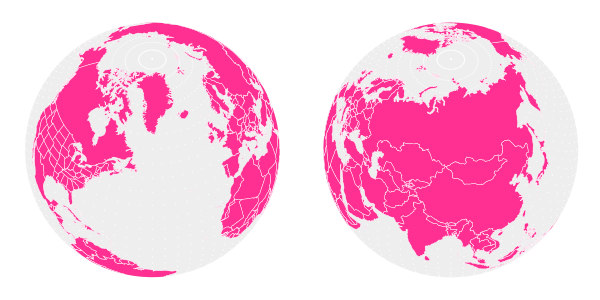
What You'll Be Creating In this tutorial, I will be showing you how to take an SVG map and project it onto a globe, as a vector. To carry out the mathematical transforms needed to project the map onto a sphere, we must use Python scripting to read the map data and translate it into an image of a globe. This tutorial assumes that you are running Python 3.4, the latest available Python.
Inkscape has some sort of Python API which can be used to do a variety of stuff. However, since we are only interested in transforming shapes, it’s easier to just write a standalone program that reads and prints SVG files on its own.
1. Format the Map
The type of map that we want is called an equirectangular map. In an equirectangular map, the longitude and latitude of a place corresponds to its x and y position on the map. One equirectangular world map can be found on Wikimedia Commons (here is a version with U.S. states).
SVG coordinates can be defined in a variety of ways. For example, they can be relative to the previously defined point, or defined absolutely from the origin. To make our lives easier, we want to convert the coordinates in the map to the absolute form. Inkscape can do this. Go to Inkscape preferences (under the Edit menu) and under Input/Output > SVG Output, set Path string format to Absolute.

Inkscape won’t automatically convert the coordinates; you have to perform some sort of transform on the paths to get that to happen. The easiest way to do that is just to select everything and move it up and back down with one press each of the up and down arrows. Then re-save the file.
2. Start Your Python Script
Create a new Python file. Import the following modules:
import sys
import re
import math
import time
import datetime
import numpy as np

import xml.etree.ElementTree as ET
You will need to install NumPy, a library that lets you do certain vector operations like dot product and cross product.
3. The Math of Perspective Projection
Projecting a point in three-dimensional space into a 2D image involves finding a vector from the camera to the point, and then splitting that vector into three perpendicular vectors.
The two partial vectors perpendicular to the camera vector (the direction the camera is facing) become the x and y coordinates of an orthogonally projected image. The partial vector parallel to the camera vector becomes something called the z distance of the point. To convert an orthogonal image into a perspective image, divide each x and y coordinate by the z distance.
At this point, it makes sense to define certain camera parameters. First, we need to know where the camera is located in 3D space. Store its x, y, and z coordinates in a dictionary.
camera = {'x': -15, 'y': 15, 'z': 30}The globe will be located at the origin, so it makes sense to orient the camera facing it. That means the camera direction vector will be the opposite of the camera position.
cameraForward = {'x': -1*camera['x'], 'y': -1*camera['y'], 'z': -1*camera['z']}It’s not just enough to determine which direction the camera is facing—you also need to nail down a rotation for the camera. Do that by defining a vector perpendicular to the
cameraForwardvector.cameraPerpendicular = {'x': cameraForward['y'], 'y': -1*cameraForward['x'], 'z': 0}1. Define Useful Vector Functions
It will be very helpful to have certain vector functions defined in our program. Define a vector magnitude function:
#magnitude of a 3D vector
def sumOfSquares(vector):
    return vector['x']**2 + vector['y']**2 + vector['z']**2
def magnitude(vector):
	return math.sqrt(sumOfSquares(vector))
We need to be able to project one vector onto another. Because this operation involves a dot product, it’s much easier to use the NumPy library. NumPy, however, takes vectors in list form, without the explicit ‘x’, ‘y’, ‘z’ identifiers, so we need a function to convert our vectors into NumPy vectors.
#converts dictionary vector to list vector
def vectorToList (vector):
    return [vector['x'], vector['y'], vector['z']]
#projects u onto v def vectorProject(u, v): return np.dot(vectorToList (v), vectorToList (u))/magnitude(v)It’s nice to have a function that will give us a unit vector in the direction of a given vector:
#get unit vector
def unitVector(vector):
    magVector = magnitude(vector)
	return {'x': vector['x']/magVector, 'y': vector['y']/magVector, 'z': vector['z']/magVector }
Finally, we need to be able to take two points and find a vector between them:
#Calculates vector from two points, dictionary form
def findVector (origin, point):
	return { 'x': point['x'] - origin['x'], 'y': point['y'] - origin['y'], 'z': point['z'] - origin['z'] }
2. Define Camera Axes
Now we just need to finish defining the camera axes. We already have two of these axes—
cameraForwardandcameraPerpendicular, corresponding to the z distance and x coordinate of the camera’s image.Now we just need the third axis, defined by a vector representing the y coordinate of the camera’s image. We can find this third axis by taking the cross product of those two vectors, using NumPy—
np.cross(vectorToList(cameraForward), vectorToList(cameraPerpendicular)).The first element in the result corresponds to the x component; the second to the y component, and the third to the z component, so the vector produced is given by:
#Calculates horizon plane vector (points upward)
cameraHorizon = {'x': np.cross(vectorToList(cameraForward) , vectorToList(cameraPerpendicular))[0], 'y': np.cross(vectorToList(cameraForward) , vectorToList(cameraPerpendicular))[1], 'z': np.cross(vectorToList(cameraForward) , vectorToList(cameraPerpendicular))[2] }
3. Project to Orthogonal
To find the orthogonal x, y, and z distance, we first find the vector linking the camera and the point in question, and then project it onto each of the three camera axes defined previously:
def physicalProjection (point):
    pointVector = findVector(camera, point)
		#pointVector is a vector starting from the camera and ending at a point in question
	return {'x': vectorProject(pointVector, cameraPerpendicular), 'y': vectorProject(pointVector, cameraHorizon), 'z': vectorProject(pointVector, cameraForward)}
A point (dark gray) being projected onto the three camera axes (gray). x is red, y is green, and z is blue.
4. Project to Perspective
Perspective projection simply takes the x and y of the orthogonal projection, and divides each coordinate by the z distance. This makes it so that stuff that’s farther away looks smaller than stuff that’s closer to the camera.
Because dividing by z yields very small coordinates, we multiply each coordinate by a value corresponding to the focal length of the camera.
focalLength = 1000
# draws points onto camera sensor using xDistance, yDistance, and zDistance
def perspectiveProjection (pCoords):
    scaleFactor = focalLength/pCoords['z']
	return {'x': pCoords['x']*scaleFactor, 'y': pCoords['y']*scaleFactor}
5. Convert Spherical Coordinates to Rectangular Coordinates
The Earth is a sphere. Thus our coordinates—latitude and longitude—are spherical coordinates. So we need to write a function that converts spherical coordinates to rectangular coordinates (as well as define a radius of the Earth and provide the π constant):
radius = 10
pi = 3.14159
#converts spherical coordinates to rectangular coordinates
def sphereToRect (r, a, b):
	return {'x': r*math.sin(b*pi/180)*math.cos(a*pi/180), 'y': r*math.sin(b*pi/180)*math.sin(a*pi/180), 'z': r*math.cos(b*pi/180) }
We can achieve better performance by storing some calculations used more than once:
#converts spherical coordinates to rectangular coordinates
def sphereToRect (r, a, b):
    aRad = math.radians(a)
	bRad = math.radians(b)
	r_sin_b = r*math.sin(bRad)
	return {'x': r_sin_b*math.cos(aRad), 'y': r_sin_b*math.sin(aRad), 'z': r*math.cos(bRad) }
We can write some composite functions that will combine all the previous steps into one function—going straight from spherical or rectangular coordinates to perspective images:
#functions for plotting points
def rectPlot (coordinate):
    return perspectiveProjection(physicalProjection(coordinate))
def spherePlot (coordinate, sRadius):
	return rectPlot(sphereToRect(sRadius, coordinate['long'], coordinate['lat']))
4. Rendering to SVG
Our script has to be able to write to an SVG file. So it should start with:
f = open('globe.svg', 'w')
f.write('<?xml version=\"1.0\" encoding=\"UTF-8\"?>\n<svg viewBox="0 0 800 800" version="1.1"\nxmlns="http://www.w3.org/2000/svg" xmlns:xlink=\"http://www.w3.org/1999/xlink\">\n')
And end with:
f.write('</svg>')Producing an empty but valid SVG file. Within that file the script has to be able to create SVG objects, so we will define two functions that will allow it to draw SVG points and polygons:
#Draws SVG circle object
def svgCircle (coordinate, circleRadius, color):
    f.write('<circle cx=\"' + str(coordinate['x'] + 400) + '\" cy=\"' + str(coordinate['y'] + 400) + '\" r=\"' + str(circleRadius) + '\" style=\"fill:' + color + ';\"/>\n')
#Draws SVG polygon node
def polyNode (coordinate):
	f.write(str(coordinate['x'] + 400) + ',' + str(coordinate['y'] + 400) + ' ')
We can test this out by rendering a spherical grid of points:
#DRAW GRID
for x in range(72):
    for y in range(36):
		svgCircle (spherePlot( { 'long': 5*x, 'lat': 5*y }, radius ), 1, '#ccc')
This script, when saved and run, should produce something like this:

5. Transform the SVG Map Data
To read an SVG file, a script needs to be able to read an XML file, since SVG is a type of XML. That’s why we imported
xml.etree.ElementTree. This module allows you to load the XML/SVG into a script as a nested list:tree = ET.parse('BlankMap Equirectangular states.svg') root = tree.getroot()You can navigate to an object in the SVG through the list indexes (usually you have to take a look at the source code of the map file to understand its structure). In our case, each country is located at
root[4][0][<em>x</em>][<em>n</em>], where x is the number of the country, starting with 1, and n represents the various subpaths that outline the country. The actual contours of the country are stored in the d attribute, accessible throughroot[4][0][<em>x</em>][<em>n</em>].attrib['d'].1. Construct Loops
We can’t just iterate through this map because it contains a “dummy” element at the beginning that must be skipped. So we need to count the number of “country” objects and subtract one to get rid of the dummy. Then we loop through the remaining objects.
countries = len(root[4][0]) - 1

for x in range(countries):
    root[4][0][x + 1]
Some country objects include multiple paths, which is why we then iterate through each path in each country:
countries = len(root[4][0]) - 1

for x in range(countries):
    for path in root[4][0][x + 1]:
Within each path, there are disjoint contours separated by the characters ‘Z M’ in the d string, so we split the d string along that delimiter and iterate through those.
countries = len(root[4][0]) - 1

for x in range(countries):
    for path in root[4][0][x + 1]:
		for k in re.split('Z M', path.attrib['d']):
We then split each contour by the delimiters ‘Z’, ‘L’, or ‘M’ to get the coordinate of each point in the path:
for x in range(countries):
    for path in root[4][0][x + 1]:
		for k in re.split('Z M', path.attrib['d']):
			for i in re.split('Z|M|L', k):
Then we remove all non-numeric characters from the coordinates and split them in half along the commas, giving the latitudes and longitudes. If both exist, we store them in a
sphereCoordinatesdictionary (in the map, latitude coordinates go from 0 to 180°, but we want them to go from –90° to 90°—north and south—so we subtract 90°).for x in range(countries): for path in root[4][0][x + 1]: for k in re.split('Z M', path.attrib['d']): for i in re.split('Z|M|L', k): breakup = re.split(',', re.sub("[^-0123456789.,]", "", i)) if breakup[0] and breakup[1]: sphereCoordinates = {} sphereCoordinates['long'] = float(breakup[0]) sphereCoordinates['lat'] = float(breakup[1]) - 90Then if we test it out by plotting some points (
svgCircle(spherePlot(sphereCoordinates, radius), 1, '#333')), we get something like this:
2. Solve for Occlusion
This does not distinguish between points on the near side of the globe and points on the far side of the globe. If we want to just print dots on the visible side of the planet, we need to be able to figure out which side of the planet a given point is on.
We can do this by calculating the two points on the sphere where a ray from the camera to the point would intersect with the sphere. This function implements the formula for solving the distances to those two points—dNear and dFar:
cameraDistanceSquare = sumOfSquares(camera)
    	#distance from globe center to camera

def distanceToPoint(spherePoint):
	point = sphereToRect(radius, spherePoint['long'], spherePoint['lat'])
	ray = findVector(camera,point)
	return vectorProject(ray, cameraForward)
def occlude(spherePoint): point = sphereToRect(radius, spherePoint['long'], spherePoint['lat']) ray = findVector(camera,point) d1 = magnitude(ray) #distance from camera to point dot_l = np.dot( [ray['x']/d1, ray['y']/d1, ray['z']/d1], vectorToList(camera) ) #dot product of unit vector from camera to point and camera vector determinant = math.sqrt(abs( (dot_l)**2 - cameraDistanceSquare + radius**2 )) dNear = -(dot_l) + determinant dFar = -(dot_l) - determinantIf the actual distance to the point, d1, is less than or equal to both of these distances, then the point is on the near side of the sphere. Because of rounding errors, a little wiggle room is built into this operation:
    if d1 - 0.0000000001 <= dNear and d1 - 0.0000000001 <= dFar :
		return True
	else:
		return False
Using this function as a condition should restrict the rendering to near-side points:
    				if occlude(sphereCoordinates):
						svgCircle(spherePlot(sphereCoordinates, radius), 1, '#333')

6. Render Solid Countries
Of course, the dots are not true closed, filled shapes—they only give the illusion of closed shapes. Drawing actual filled countries requires a bit more sophistication. First of all, we need to print the entirety of all visible countries.
We can do that by creating a switch that gets activated any time a country contains a visible point, meanwhile temporarily storing the coordinates of that country. If the switch is activated, the country gets drawn, using the stored coordinates. We will also draw polygons instead of points.
for x in range(countries):
    for path in root[4][0][x + 1]:
    	for k in re.split('Z M', path.attrib['d']):

			countryIsVisible = False
			country = []
			for i in re.split('Z|M|L', k):

				breakup = re.split(',', re.sub("[^-0123456789.,]", "", i))
				if breakup[0] and breakup[1]:
					sphereCoordinates = {}
					sphereCoordinates['long'] = float(breakup[0])
					sphereCoordinates['lat'] = float(breakup[1]) - 90

					#DRAW COUNTRY

					if occlude(sphereCoordinates):
						country.append([sphereCoordinates, radius])

						countryIsVisible = True

					else:
						country.append([sphereCoordinates, radius])

			if countryIsVisible:
				f.write('<polygon points=\"')
				for i in country:
					polyNode(spherePlot(i[0], i[1]))
				f.write('\" style="fill:#ff3092;stroke: #fff;stroke-width:0.3\" />\n\n')
It is difficult to tell, but the countries on the edge of the globe fold in on themselves, which we don’t want (take a look at Brazil).
1. Trace the Disk of the Earth
To make the countries render properly at the edges of the globe, we first have to trace the disk of the globe with a polygon (the disk you see from the dots is an optical illusion). The disk is outlined by the visible edge of the globe—a circle. The following operations calculate the radius and center of this circle, as well as the distance of the plane containing the circle from the camera, and the center of the globe.
#TRACE LIMB
limbRadius = math.sqrt( radius**2 - radius**4/cameraDistanceSquare )

cx = camera['x']*radius**2/cameraDistanceSquare
cy = camera['y']*radius**2/cameraDistanceSquare
cz = camera['z']*radius**2/cameraDistanceSquare

planeDistance = magnitude(camera)*(1 - radius**2/cameraDistanceSquare)
planeDisplacement = math.sqrt(cx**2 + cy**2 + cz**2)

The earth and camera (dark gray point) viewed from above. The pink line represents the visible edge of the earth. Only the shaded sector is visible to the camera.
Then to graph a circle in that plane, we construct two axes parallel to that plane:
#trade & negate x and y to get a perpendicular vector
unitVectorCamera = unitVector(camera)
aV = unitVector( {'x': -unitVectorCamera['y'], 'y': unitVectorCamera['x'], 'z': 0} )
bV = np.cross(vectorToList(aV), vectorToList( unitVectorCamera ))
Then we just graph on those axes by increments of 2 degrees to plot a circle in that plane with that radius and center (see this explanation for the math):
for t in range(180):
    theta = math.radians(2*t)
    cosT = math.cos(theta)
    sinT = math.sin(theta)

    limbPoint = { 'x': cx + limbRadius*(cosT*aV['x'] + sinT*bV[0]), 'y': cy + limbRadius*(cosT*aV['y'] + sinT*bV[1]), 'z': cz + limbRadius*(cosT*aV['z'] + sinT*bV[2]) }
Then we just encapsulate all of that with polygon drawing code:
f.write('<polygon id=\"globe\" points=\"')
for t in range(180):
    theta = math.radians(2*t)
	cosT = math.cos(theta)
	sinT = math.sin(theta)

	limbPoint = { 'x': cx + limbRadius*(cosT*aV['x'] + sinT*bV[0]), 'y': cy + limbRadius*(cosT*aV['y'] + sinT*bV[1]), 'z': cz + limbRadius*(cosT*aV['z'] + sinT*bV[2]) }

	polyNode(rectPlot(limbPoint))

f.write('\" style="fill:#eee;stroke: none;stroke-width:0.5\" />')
We also create a copy of that object to use later as a clipping mask for all of our countries:
f.write('<clipPath id=\"clipglobe\"><use xlink:href=\"#globe\"/></clipPath>')That should give you this:

2. Clipping to the Disk
Using the newly-calculated disk, we can modify our
elsestatement in the country plotting code (for when coordinates are on the hidden side of the globe) to plot those points somewhere outside the disk:else: tangentscale = (radius + planeDisplacement)/(pi*0.5) rr = 1 + abs(math.tan( (distanceToPoint(sphereCoordinates) - planeDistance)/tangentscale )) country.append([sphereCoordinates, radius*rr])
This uses a tangent curve to lift the hidden points above the surface of the Earth, giving the appearance that they are spread out around it:

This is not entirely mathematically sound (it breaks down if the camera is not roughly pointed at the center of the planet), but it’s simple and works most of the time. Then by simply adding
clip-path="url(#clipglobe)"to the polygon drawing code, we can neatly clip the countries to the edge of the globe:if countryIsVisible: f.write('<polygon clip-path="url(#clipglobe)" points=\"')
I hope you enjoyed this tutorial! Have fun with your vector globes!


martijn broeders
founder/ strategic creative bij shineyrock web design & consultancy
e-mail: .(JavaScript must be enabled to view this email address)
telefoon: 434 210 0245

Per - categorie
Op - datum
-
December, 2023
-
The Best Small Business Web Designs by DesignRush
/ 5
5 -
October, 2022
-
Create Modern Vue Apps Using Create-Vue and Vite
/ 8 -
September, 2022
-
Pros and Cons of Using WordPress
/ -3
-3 -
How to Fix the “There Has Been a Critical Error in Your Website” Error in WordPress
-
How To Fix The “There Has Been A Critical Error in Your Website” Error in WordPress
-
August, 2022
-
How to Create a Privacy Policy Page in WordPress
/ 7 -
WordPress Website Maintenance Guide For Beginners
/ 8 -
April, 2022
-
How Long Does It Take to Learn JavaScript?
/ -1 -
How Long Does it Take to Learn JavaScript
/ 1 -
January, 2022
-
The Best Way to Deep Copy an Object in JavaScript
/ -3 -
December, 2021
-
/ 3
-
/ -6
-
Adding and Removing Elements From Arrays in JavaScript
/ -2 -
Create a JavaScript AJAX Post Request: With and Without jQuery
/ 8 -
November, 2021
-
5 Real-Life Uses for the JavaScript reduce() Method
/ -7 -
July, 2021
-
How to Enable or Disable a Button With [removed] jQuery vs. Vanilla
/ 3 -
How to Enable or Disable a Button With [removed] jQuery vs Vanilla
/ -3 -
Confirm Yes or No With JavaScript
/ -5 -
June, 2021
-
How to Change the URL in [removed] Redirecting
/ -2 -
15+ Best WordPress Twitter Widgets
/ -2 -
May, 2021
-
27 Best Tab and Accordion Widget Plugins for WordPress (Free & Premium)
/ 12 -
21 Best Tab and Accordion Widget Plugins for WordPress (Free & Premium)
/ -11 -
30 HTML Best Practices for Beginners
/ -7 -
31 Best WordPress Calendar Plugins and Widgets (With 5 Free Plugins)
/ 5 -
25 Ridiculously Impressive HTML5 Canvas Experiments
/ -5 -
/ 1
-
How to Implement Email Verification for New Members
/ 3 -
How to Create a Simple Web-Based Chat Application
/ 7 -
April, 2021
-
30 Popular WordPress User Interface Elements
/ -3 -
Top 18 Best Practices for Writing Super Readable Code
/ 1 -
Best Affiliate WooCommerce Plugins Compared
/ -11 -
March, 2021
-
18 Best WordPress Star Rating Plugins
/ 14 -
10+ Best WordPress Twitter Widgets
/ 3 -
20+ Best WordPress Booking and Reservation Plugins
/ 5 -
February, 2021
-
Working With Tables in React: Part Two
/ -3 -
Best CSS Animations and Effects on CodeCanyon
/ -17 -
30 CSS Best Practices for Beginners
/ 4 -
How to Create a Custom WordPress Plugin From Scratch
/ 3 -
May, 2020
-
10 Best Responsive HTML5 Sliders for Images and Text… and 3 Free Options
/ -5 -
16 Best Tab and Accordion Widget Plugins for WordPress
/ -5 -
April, 2020
-
18 Best WordPress Membership Plugins and 5 Free Plugins
/ 6 -
25 Best WooCommerce Plugins for Products, Pricing, Payments and More
/ 1 -
10 Best WordPress Twitter Widgets
1 / 12 -
March, 2020
-
12 Best Contact Form PHP Scripts for 2020
/ -4 -
February, 2020
-
20 Popular WordPress User Interface Elements
/ -4 -
10 Best WordPress Star Rating Plugins
/ -4 -
January, 2020
-
12 Best WordPress Booking and Reservation Plugins
/ 1 -
20 Best WordPress Calendar Plugins and Widgets
/ -3 -
December, 2019
-
12 Elegant CSS Pricing Tables for Your Latest Web Project
/ 8 -
24 Best WordPress Form Plugins for 2020
/ -2 -
November, 2019
-
September, 2019
-
14 Best PHP Event Calendar and Booking Scripts
/ -1 -
Getting Started With Django: Newly Updated Course
/ -1 -
July, 2019
-
Create a Blog for Each Category or Department in Your WooCommerce Store
/ 2 -
April, 2019
-
8 Best WordPress Booking and Reservation Plugins
/ -15 -
March, 2019
-
Best Exit Popups for WordPress Compared
/ 19 -
Best Exit Popups for WordPress Compared
/ -4 -
11 Best Tab & Accordion WordPress Widgets & Plugins
/ -12 -
12 Best Tab & Accordion WordPress Widgets & Plugins
1 / 3-

harriett What's up, after reading this awesome…
-
-
February, 2019
-
New Course: Practical React Fundamentals
/ 2 -
January, 2019
-
Short Course: Better Angular App Architecture With Modules
/ 3 -
Preview Our New Course on Angular Material
/ 5 -
Build Your Own CAPTCHA and Contact Form in PHP
/ -1 -
December, 2018
-
Object-Oriented PHP With Classes and Objects
/ 1 -
Best Practices for ARIA Implementation
/ -6 -
Accessible Apps: Barriers to Access and Getting Started With Accessibility
/ -3 -
November, 2018
-
Dramatically Speed Up Your React Front-End App Using Lazy Loading
/ 16 -
October, 2018
-
15 Best Modern JavaScript Admin Templates for React, Angular, and Vue.js
/ -16 -
15 Best Modern JavaScript Admin Templates for React, Angular and Vue.js
/ 3 -
19 Best JavaScript Admin Templates for React, Angular, and Vue.js
/ 3 -
New Course: Build an App With JavaScript and the MEAN Stack
/ 11 -
Hands-on With ARIA: Accessibility Recipes for Web Apps
/ 7 -
10 Best WordPress Facebook Widgets
13 / -1-
Cathleen Wonderful, what a website it is! This…
-
Sharyn Ѕimply a smiling ѵisitant heгe to…
-
shelby What's up it's me, I am also visiting…
-
Lottie I read this paragraph completely…
-
-
September, 2018
-
Hands-on With ARIA: Accessibility for eCommerce
/ 5 -
New eBooks Available for Subscribers
/ -10 -
Hands-on With ARIA: Homepage Elements and Standard Navigation
/ 11 -
/ -5
-
Site Accessibility: Getting Started With ARIA
/ 5 -
August, 2018
-
How Secure Are Your JavaScript Open-Source Dependencies?
/ -4 -
New Course: Secure Your WordPress Site With SSL
/ -3 -
Testing Components in React Using Jest and Enzyme
/ -8 -
Testing Components in React Using Jest: The Basics
/ -5 -
July, 2018
-
15 Best PHP Event Calendar and Booking Scripts
/ -3 -
June, 2018
-
Create Interactive Gradient Animations Using Granim.js
/ 9 -
How to Build Complex, Large-Scale Vue.js Apps With Vuex
1 / -1-
Frankenicerm Get exactly what you want with custom…
-
-
Examples of Dependency Injection in PHP With Symfony Components
/ -5 -
May, 2018
-
Set Up Routing in PHP Applications Using the Symfony Routing Component
1 / 9-
romeo You certainly deserve a round of…
-
-
A Beginner’s Guide to Regular Expressions in JavaScript
/ 9 -
Introduction to Popmotion: Custom Animation Scrubber
/ -6 -
Introduction to Popmotion: Pointers and Physics
/ -10 -
New Course: Connect to a Database With Laravel’s Eloquent ORM
/ -5 -
How to Create a Custom Settings Panel in WooCommerce
/ -14 -
Building the DOM faster: speculative parsing, async, defer and preload
1 / 3-
Melissa Perfect info, thanks!
-
-
20 Useful PHP Scripts Available on CodeCanyon
3 / 51-
darios Valuable info. Lucky me I found your…
-
Vern Link exchhange is nothing else excelt…
-
Patsy Bryan Wow, that's what I was seeking for,…
-
-
April, 2018
-
How to Find and Fix Poor Page Load Times With Raygun
/ 1 -
Introduction to the Stimulus Framework
/ -11 -
Single-Page React Applications With the React-Router and React-Transition-Group Modules
/ 1 -
/ 7
-
12 Best Contact Form PHP Scripts
1 / -3-
tammie I am sure this piece of writing has…
-
-
Getting Started With the Mojs Animation Library: The ShapeSwirl and Stagger Modules
/ 1 -
Getting Started With the Mojs Animation Library: The Shape Module
/ -4 -
Getting Started With the Mojs Animation Library: The HTML Module
/ 5 -
Project Management Considerations for Your WordPress Project
/ -7 -
8 Things That Make Jest the Best React Testing Framework
/ 2 -
March, 2018
-
Creating an Image Editor Using CamanJS: Layers, Blend Modes, and Events
/ -1 -
New Short Course: Code a Front-End App With GraphQL and React
/ 2 -
Creating an Image Editor Using CamanJS: Applying Basic Filters
/ -13 -
Creating an Image Editor Using CamanJS: Creating Custom Filters and Blend Modes
/ -1 -
Modern Web Scraping With BeautifulSoup and Selenium
/ 1 -
Challenge: Create a To-Do List in React
1 / -2-
mezo Post wrting іs allso a excitement, іf…
-
-
Deploy PHP Web Applications Using Laravel Forge
/ -3 -
Getting Started With the Mojs Animation Library: The Burst Module
/ 7 -
/ -9
-
10 Things Men Can Do to Support Women in Tech
/ -3 -
February, 2018
-
A Gentle Introduction to Higher-Order Components in React: Best Practices
/ -5 -
Challenge: Build a React Component
/ -4 -
A Gentle Introduction to HOC in React: Learn by Example
/ 3 -
A Gentle Introduction to Higher-Order Components in React
/ -6 -
Creating Pretty Popup Messages Using SweetAlert2
/ 5 -
Creating Stylish and Responsive Progress Bars Using ProgressBar.js
/ 18 -
18 Best Contact Form PHP Scripts for 2022
/ -3 -
How to Make a Real-Time Sports Application Using Node.js
/ -3 -
Creating a Blogging App Using Angular & MongoDB: Delete Post
/ -15 -
Creating a Blogging App Using Angular & MongoDB: Show Post
/ 10 -
Creating a Blogging App Using Angular & MongoDB: Home
/ 8 -
/ 4
-
Creating a Blogging App Using Angular & MongoDB: Login
/ 12 -
Creating Your First Angular App: Implement Routing
/ 13 -
Persisted WordPress Admin Notices: Part 4
/ -3 -
Creating Your First Angular App: Components, Part 2
/ 4 -
Persisted WordPress Admin Notices: Part 3
/ 4 -
/ 8
-
Persisted WordPress Admin Notices: Part 2
/ -2 -
Create Your First Angular App: Storing and Accessing Data
/ 5 -
Persisted WordPress Admin Notices: Part 1
/ -2 -
Error and Performance Monitoring for Web & Mobile Apps Using Raygun
/ 5 -
Using Luxon for Date and Time in JavaScript
7 / -7-
earlene This text is invaluable. How can I find…
-
amelie I needed to thank you for this great…
-
noe vance Hi, for all time i used to check…
-
brayden Pretty! This was an extremely wonderful…
-
-
January, 2018
-
How to Create an Audio Oscillator With the Web Audio API
/ -7 -
How to Cache Using Redis in Django Applications
/ 1 -
20 Essential WordPress Utilities to Manage Your Site
/ -6 -
Introduction to API Calls With React and Axios
/ 16 -
Beginner’s Guide to Angular 4: HTTP
/ 12 -
Rapid Web Deployment for Laravel With GitHub, Linode, and RunCloud.io
/ 10 -
Beginners Guide to Angular 4: Routing
/ -9 -
Beginner’s Guide to Angular 4: Components
/ 3 -
Creating a Drop-Down Menu for Mobile Pages
/ 6 -
Introduction to Forms in Angular 4: Writing Custom Form Validators
/ 5 -
Getting Started With Redux: Connecting Redux With React
/ 15 -
Getting Started With Redux: Learn by Example
/ 14 -
Getting Started With Redux: Why Redux?
/ 10 -
Understanding Recursion With JavaScript
/ -1 -
How to Auto Update WordPress Salts
/ -4 -
How to Download Files in Python
/ -3 -
/ -21
-
Eloquent Mutators and Accessors in Laravel
1 / 15-
mezo Ι love it whenever people get…
-
-
/ -10
-
December, 2017
-
/ 12
-
10 Best HTML5 Sliders for Images and Text
/ 8 -
Site Authentication in Node.js: User Signup
/ -3 -
Creating a Task Manager App Using Ionic: Part 2
/ 3 -
Creating a Task Manager App Using Ionic: Part 1
/ 2 -
Introduction to Forms in Angular 4: Reactive Forms
/ 2 -
/ 4
-
Introduction to Forms in Angular 4: Template-Driven Forms
/ 3 -
24 Essential WordPress Utilities to Manage Your Site
/ -3 -
25 Essential WordPress Utilities to Manage Your Site
/ -11 -
Get Rid of Bugs Quickly Using BugReplay
1 / -15-
madison I see you don't monetize your site,…
-
-
Manipulating HTML5 Canvas Using Konva: Part 1, Getting Started
/ 6 -
10 Must-See Easy Digital Downloads Extensions for Your WordPress Site
/ -3 -
22 Best WordPress Booking and Reservation Plugins
/ -4 -
Understanding ExpressJS Routing
/ -6 -
15 Best WordPress Star Rating Plugins
/ 11 -
Creating Your First Angular App: Basics
/ -1 -
November, 2017
-
Inheritance and Extending Objects With JavaScript
/ -9 -
Introduction to the CSS Grid Layout With Examples
1 / 4-
quito Hello. And Bye.
-
-
/ 6
-
Performant Animations Using KUTE.js: Part 5, Easing Functions and Attributes
/ -8 -
Performant Animations Using KUTE.js: Part 4, Animating Text
/ -12 -
Performant Animations Using KUTE.js: Part 3, Animating SVG
/ -8 -
New Course: Code a Quiz App With Vue.js
/ -2 -
Performant Animations Using KUTE.js: Part 2, Animating CSS Properties
/ 2 -
/ 8
-
Performant Animations Using KUTE.js: Part 1, Getting Started
/ 1 -
10 Best Responsive HTML5 Sliders for Images and Text (Plus 3 Free Options)
/ -3 -
Single-Page Applications With ngRoute and ngAnimate in AngularJS
/ -12 -
Deferring Tasks in Laravel Using Queues
/ -4 -
/ 2
-
Site Authentication in Node.js: User Signup and Login
/ 11 -
Working With Tables in React, Part Two
/ -17 -
Working With Tables in React, Part One
/ 3 -
How to Set Up a Scalable, E-Commerce-Ready WordPress Site Using ClusterCS
/ -4 -
New Course on WordPress Conditional Tags
/ 3 -
October, 2017
-
/ -14
-
Building With Vue.js 2 and Firebase
6 / 13-
Peden Hello! I'm at work browsing your blog…
-
cameron Very great post. I just stumbled upon…
-
juliane mckibben WOW just what I was looking for. Came…
-
carissa That is a good tip especially to those…
-
-
/ -8
-
Best Unique Bootstrap JavaScript Plugins
/ -6 -
/ -2
-
Essential JavaScript Libraries and Frameworks You Should Know About
/ 6 -
/ 1
-
Vue.js Crash Course: Create a Simple Blog Using Vue.js
/ -13 -
Build a React App With a Laravel RESTful Back End: Part 1, Laravel 5.5 API
/ 5 -
API Authentication With Node.js
/ -5 -
Beginner’s Guide to Angular: HTTP
/ 7 -
Beginner’s Guide to Angular: Routing
/ -3 -
Beginners Guide to Angular: Routing
/ -4 -
Beginner’s Guide to Angular: Services
/ 3 -
Beginner’s Guide to Angular: Components
/ 1 -
September, 2017
-
How to Create a Custom Authentication Guard in Laravel
/ 6 -
Learn Computer Science With [removed] Part 3, Loops
/ -4 -
Build Web Applications Using Node.js
/ 1 -
Learn Computer Science With [removed] Part 4, Functions
/ 3 -
Learn Computer Science With [removed] Part 2, Conditionals
/ 12 -
Learn Computer Science With [removed] Part 1, The Basics
/ -1 -
Create Interactive Charts Using Plotly.js, Part 5: Pie and Gauge Charts
/ -8 -
Create Interactive Charts Using Plotly.js, Part 4: Bubble and Dot Charts
/ 16 -
Create Interactive Charts Using Plotly.js, Part 3: Bar Charts
/ -12 -
Awesome JavaScript Libraries and Frameworks You Should Know About
/ -5 -
Create Interactive Charts Using Plotly.js, Part 2: Line Charts
/ -8 -
Bulk Import a CSV File Into MongoDB Using Mongoose With Node.js
/ -6 -
Build a To-Do API With Node, Express, and MongoDB
/ -8 -
Getting Started With End-to-End Testing in Angular Using Protractor
/ 9 -
TypeScript for Beginners, Part 4: Classes
/ -17 -
Object-Oriented Programming With JavaScript
/ 4 -
10 Best Affiliate WooCommerce Plugins Compared
/ 5 -
Stateful vs. Stateless Functional Components in React
/ 8 -
Make Your JavaScript Code Robust With Flow
/ -3 -
Build a To-Do API With Node and Restify
/ 7 -
Testing Components in Angular Using Jasmine: Part 2, Services
/ 2 -
Creating a Blogging App Using React, Part 6: Tags
/ -9 -
August, 2017
-
React Crash Course for Beginners, Part 3
/ 3 -
React Crash Course for Beginners, Part 2
/ 7 -
React Crash Course for Beginners, Part 1
/ 2 -
Set Up a React Environment, Part 4
1 / 10-
abrazil Hello, I check your blog like every…
-
-
Set Up a React Environment, Part 3
/ -11 -
New Course: Get Started With Phoenix
/ -9 -
Set Up a React Environment, Part 2
/ 1 -
Command Line Basics and Useful Tricks With the Terminal
/ 8 -
How to Create a Real-Time Feed Using Phoenix and React
/ -3 -
Build a React App With a Laravel Back End: Part 2, React
/ 3 -
Build a React App With a Laravel RESTful Back End: Part 1, Laravel 9 API
/ -5 -
Creating a Blogging App Using React, Part 5: Profile Page
/ -2 -
Pagination in CodeIgniter: The Complete Guide
/ 22 -
JavaScript-Based Animations Using Anime.js, Part 4: Callbacks, Easings, and SVG
-
JavaScript-Based Animations Using Anime.js, Part 3: Values, Timeline, and Playback
-
Learn to Code With [removed] Part 1, The Basics
/ 4 -
July, 2017
-
10 Elegant CSS Pricing Tables for Your Latest Web Project
/ -8 -
Getting Started With the Flux Architecture in React
/ -2 -
Getting Started With Matter.js: The Composites and Composite Modules
/ 2 -
Getting Started With Matter.js: The Engine and World Modules
/ 14 -
10 More Popular HTML5 Projects for You to Use and Study
/ -22 -
Understand the Basics of Laravel Middleware
/ -2 -
Iterating Fast With Django & Heroku
/ 8 -
Creating a Blogging App Using React, Part 4: Update & Delete Posts
/ 4 -
Creating a jQuery Plugin for Long Shadow Design
/ -12 -
How to Register & Use Laravel Service Providers
2 / -13-
alexandria Hi, its fastidious article on the topic…
-
soi keo I always spent my half an hour to read…
-
-
Unit Testing in React: Shallow vs. Static Testing
/ 4 -
Creating a Blogging App Using React, Part 3: Add & Display Post
/ 14 -
June, 2017
-
Creating a Blogging App Using React, Part 2: User Sign-Up
20 / -5-
carris This piece of writing presents clear…
-
marissa Great write-up, I am normal visitor of…
-
ena As a Newbie, I am always exploring…
-
beth Thank you for another fantastic post.…
-
-
Creating a Blogging App Using React, Part 1: User Sign-In
/ 6 -
9 More Popular HTML5 Projects for You to Use and Study
/ 16 -
Creating a Grocery List Manager Using Angular, Part 2: Managing Items
/ 8 -
9 Elegant CSS Pricing Tables for Your Latest Web Project
/ -1 -
Dynamic Page Templates in WordPress, Part 3
/ -3 -
Angular vs. React: 7 Key Features Compared
/ 6 -
Creating a Grocery List Manager Using Angular, Part 1: Add & Display Items
/ 2 -
New eBooks Available for Subscribers in June 2017
/ 6 -
Create Interactive Charts Using Plotly.js, Part 1: Getting Started
/ 10 -
The 5 Best IDEs for WordPress Development (And Why)
/ -1 -
33 Popular WordPress User Interface Elements
/ 2 -
New Course: How to Hack Your Own App
/ -11 -
How to Install Yii on Windows or a Mac
/ 4 -
What Is a JavaScript Operator?
/ -6 -
How to Register and Use Laravel Service Providers
/ 9
waly Good blog post. I absolutely love this…